
Canva Pro · Magic Grab
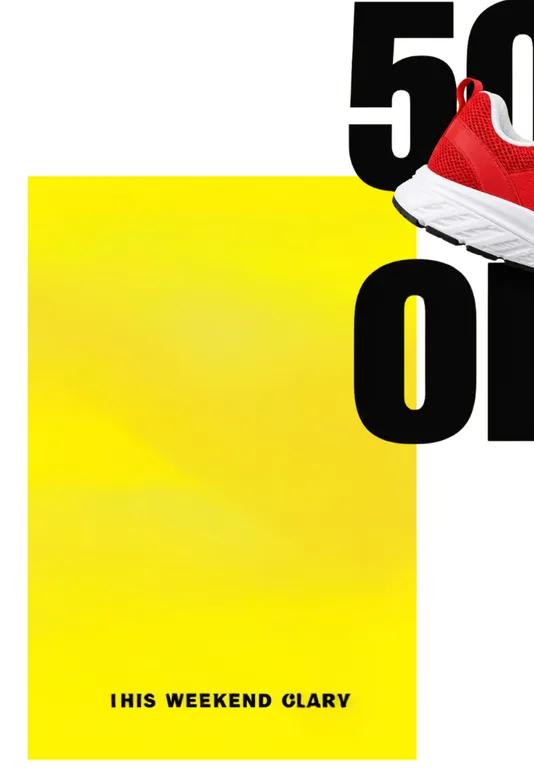
Returned 2 layers: merged the red sneaker and the black "50% OFF" type into a single cutout, and rewrote "THIS WEEKEND ONLY" on the background as "IHIS WEEKEND CLARY".
Pick Canva Pro (Magic Grab & AI Layers) if your team already works inside Canva slides and wants bold Latin headlines turned into live Canva text boxes. Pick Unmerge when you need a flat poster, character or product scene split into named transparent raster layers and downloaded directly as a Photoshop/Photopea .PSD or PNG ZIP — starting from $3.90 one-time with no subscription.
We ran the 832 × 1248 Sneaker sale poster through Canva Pro’s Magic Grab, Canva Pro’s AI Layers, and Unmerge on November 14, 2026.
Returned 2 layers: merged the red sneaker and the black "50% OFF" type into a single cutout, and rewrote "THIS WEEKEND ONLY" on the background as "IHIS WEEKEND CLARY".
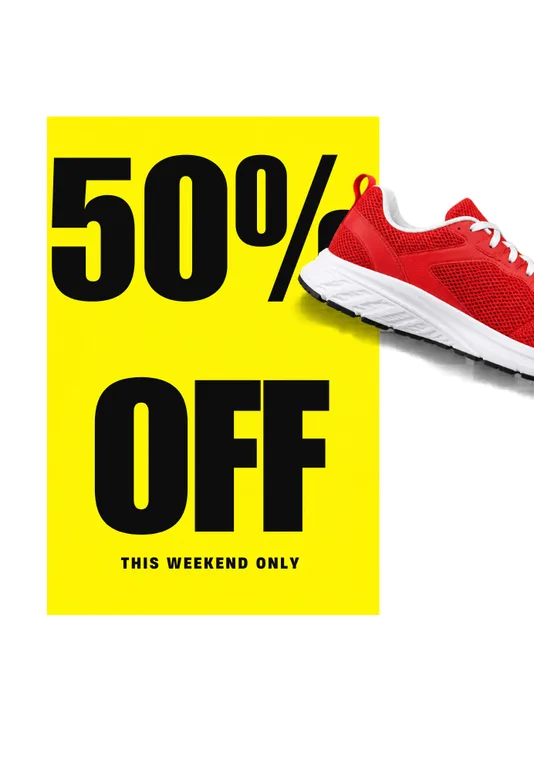
Returned 5 Canva elements: kept the sneaker’s drop shadow and turned "50%" and "OFF" into live Impact text boxes inside Canva, with no layered .PSD export.
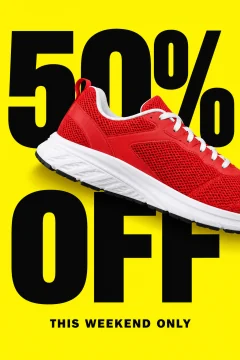
Returned 5 named transparent raster layers (filled-in yellow background, "OFF", "50%", "THIS WEEKEND ONLY", and sneaker) downloadable as a layered .PSD or PNG ZIP. Note: the sneaker lost its drop shadow.
Inspect all 5 layers in workspace| Topic | Unmerge | Canva Pro (Magic Grab & AI Layers) |
|---|---|---|
| Export formats | Layered .PSD (tested in Photoshop and Photopea), PNG ZIP of full-canvas transparent layers, composite PNG, or individual layer PNG. | 8 download formats in Canva Pro (PNG, JPG, PDF Standard, PDF Print, SVG, MP4, GIF, PPTX, WebP). No layered .PSD export and no transparent layer PNG ZIP. |
| Without a subscription | Starter pack $3.90 for 45 credits, Basic pack $10 for 130 credits. One-time payments; credits never expire. | Requires Canva Pro ($15 a month or $120 a year per person after trial). No one-time layer pack. |
| Text & typography layers | Separated as raster pixel layers in their original visual appearance, not editable font objects. | AI Layers converts recognized Latin headlines into live Canva text boxes mapped to Canva fonts (such as Impact on our test poster); Magic Grab leaves text as pixels. |
| Layer count & prompt control | Up to 17 layers by default, or up to 100 layers when your description names specific parts (such as hair, eyes, sleeves, or individual props). | Automatic pass with no prompt box: Magic Grab returned 2 layers and AI Layers returned 5 elements on our test poster. |
| Cost for our 5-layer poster | $0.38 on the Basic pack ($0.43 on the Starter pack), $0.26 on Pro monthly. Needs 5 credits to start; charged only for layers returned. | Included in $15/month Canva Pro ($21/month or $210/year for optional Unmerge Pro). |
| API & MCP for agents | HTTP API (/api/v1) and remote MCP server (/mcp) for automated layer extraction. | Interactive Canva editor workflow; no standalone image-to-PSD extraction endpoint. |
Unmerge publishes this page. We ran both Canva Magic Grab and Canva AI Layers on the same 832 × 1248 sneaker poster inside an active Canva Pro / Business account on November 14, 2026, and verified the Share → Download format list on the same day. Canva updates Magic Studio frequently; check canva.com for current plan terms.
No. As checked in Canva Pro on November 14, 2026, Share → Download exports PNG, JPG, PDF, SVG, MP4, GIF, PPTX, and WebP. Elements stay editable inside Canva (or as slides in PPTX), whereas Unmerge exports a native layered .PSD file and a PNG ZIP for Photoshop and Photopea.
In our sneaker poster test, Magic Grab lifted only one combined foreground cutout (merging the shoe with the black "50% OFF" text into 2 layers total), while Canva AI Layers split the poster into 5 separate canvas elements including live Impact text boxes and kept the shoe’s drop shadow.
Yes. Unmerge sells non-expiring one-time credit packs starting at $3.90 for 45 layer credits and $10 for 130 credits. Interactive sample workspaces and their PSD downloads are free.
When a poster uses standard Latin fonts and you want editable type inside Canva: AI Layers turned "50%" and "OFF" into live text boxes and preserved the sneaker’s drop shadow, whereas Unmerge outputs raster pixel layers and lost the drop shadow on that sample.